
Email Warm-Up Service: What It Does and Costs
What an email warm-up service does for a new mailbox, the four kinds you can buy, what each costs, what to check before paying and how long it runs.

On this page
An email warm-up service sends, opens and replies to messages from your new mailbox through a network of other inboxes, so the mailbox has a sending history before cold email starts. You can buy it four ways: included with the mailbox (Outreach2day, $2.50 per mailbox with warm-up and sending), included in a sequencer plan (Instantly, Smartlead), as an add-on (InboxKit, $3 per mailbox a month) or as a standalone subscription. Plan 14 days before the first cold email and keep it running after.
What Is an Email Warm-Up Service?
An email warm-up service builds a sending history for a new or dormant mailbox before you use it for outreach. It connects your account to a network of other inboxes, sends messages to them, and has those inboxes open, reply to and rescue the messages from spam. Providers like Gmail and Outlook see steady, wanted mail from the address.
The Challenge of Cold Emails
A new mailbox has no history. When it suddenly sends hundreds of messages to strangers, providers have nothing to judge it by except the volume and the lack of replies, and much of that mail goes to spam. Warm-up gives the mailbox a record of normal, low-volume sending first.
Building Trust With Email Providers
The process copies how a real person's mailbox grows: a few messages a day at first, replies in both directions, and volume that rises slowly. When you launch a campaign, the mailbox already has a positive history.
How the Service Operates
The service sends messages from your mailbox to inboxes in its network and generates engagement on them.
Simulating Genuine Engagement
Network inboxes open your messages, reply to them, mark them as important and move them out of spam when a provider files them there. Each of these actions is a signal that recipients want your mail.
Gradual Volume Increase
Volume starts at a few messages a day and rises over the following weeks. A slow ramp avoids the sudden volume spike that spam filters flag in new accounts.
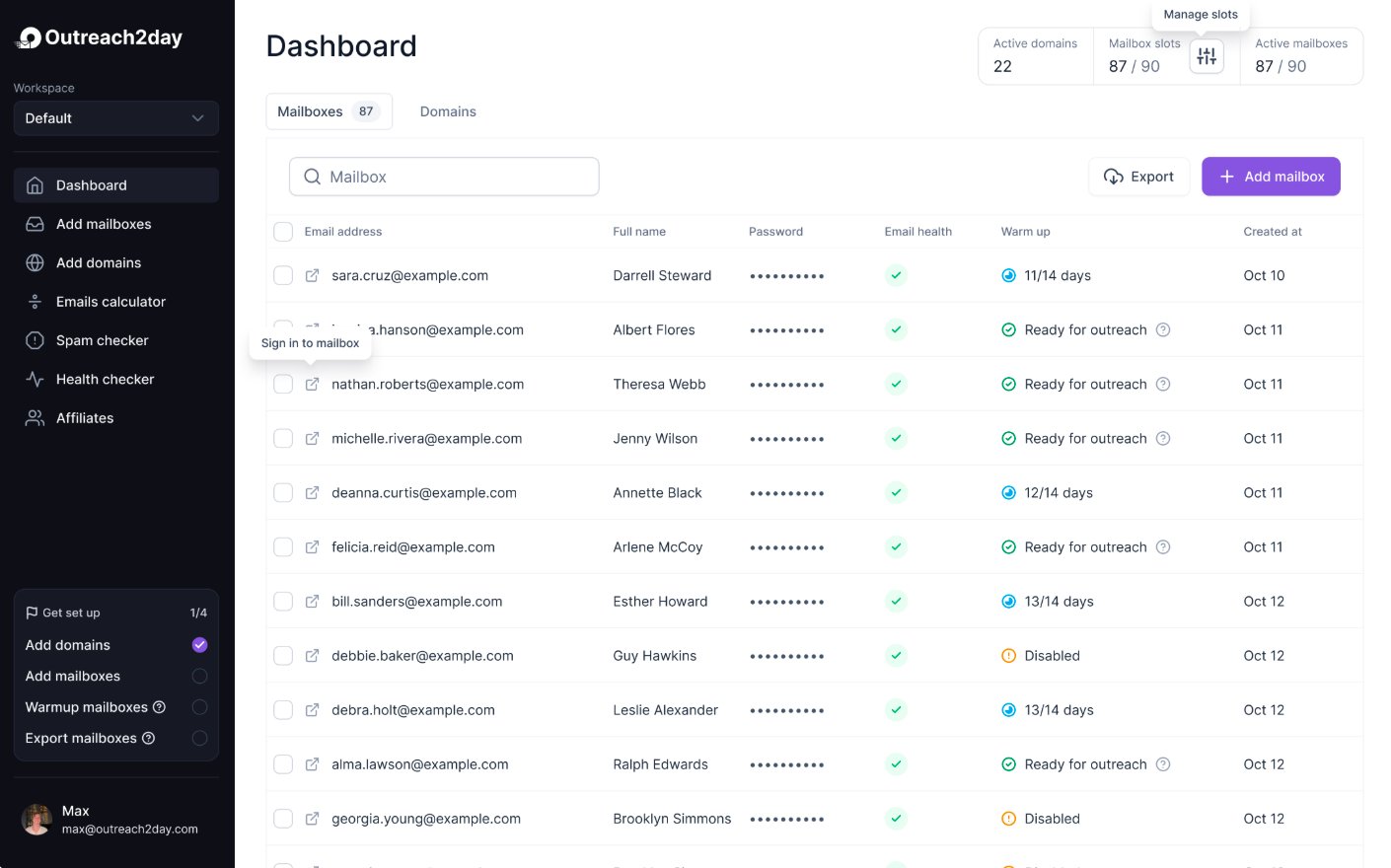
The service runs the sending, opening, replying and spam rescues for you and shows how much of the warm-up mail lands in the inbox, so you know when a mailbox is ready for campaigns.
Four Ways to Buy a Warm-Up Service
Kind | Examples | What you pay | Fits |
|---|---|---|---|
Included with the mailbox | Outreach2day | $2.50 per mailbox a month, warm-up and sending engine included | New mailboxes bought for cold email |
Included in a sequencer plan | Instantly, Smartlead | The sending plan: Instantly from $47 a month, Smartlead from $39 | Teams that already send with that sequencer |
Add-on from a mailbox seller | InboxKit | $3 per mailbox a month on top of the mailbox | Google and Microsoft mailboxes from that seller |
Standalone subscription | lemwarm, Warmup Inbox, MailReach, Warmy, Warmforge | A monthly plan per mailbox or per slot | Mailboxes you already own at Google, Microsoft or another host |
Prices from Instantly, Smartlead and InboxKit, checked September 29, 2026. Instantly also sells a premium warm-up pool from $500 a month per workspace (Instantly help); Warmforge gives Salesforge users unlimited warm-up slots (Warmforge pricing).
Pay for warm-up once. A mailbox that already warms up inside its provider or sequencer gains nothing from a second network, and two networks make the inbox rate harder to read. The standalone tools are compared one by one in best email warm-up tools; the cold email vendors that include warm-up are ranked in best cold email infrastructure providers.
Why Mailboxes Need It
Providers like Google and Microsoft filter mail from domains and mailboxes with no history or a poor one. Warm-up gives the mailbox a record of wanted mail before strangers receive anything from it, and running it alongside campaigns shows early when a mailbox starts to slip.
Free guide19 min read
Send 100,000 cold emails a month
Domains and mailboxes you need, DNS, warm-up, lists, copy and follow-ups, with a launch checklist. We email it to you and open sign-up in a new tab.
Choosing the Right Email Warm-Up Service
The service has to produce engagement that providers trust. Check three things. For a side-by-side list of tools, see best email warm-up tools compared.
Evaluate the Network Quality
Ask what the network is made of. Look for real, established mailboxes at Google Workspace, Microsoft 365, Gmail and Outlook.com. Batches of newly created accounts are a warning sign.
Prioritize Customization and Control
Look for control over:
Daily volume: the number of warm-up emails and how fast it grows.
Ramp-up speed: slower for new domains, faster for aged ones.
Reply rate: the share of warm-up emails that get a reply.
Check Monitoring and Analytics
You need to see inbox vs spam placement per mailbox and per provider, and get an alert when a mailbox starts to slip. Without that, you are guessing when a mailbox is ready.
Best Practices for Effective Email Warm-Up
A warm-up service works best with a correct setup around it.
Give It Time
Plan 14 days of warm-up only, then low cold volume, and up to 25 cold emails per mailbox a day around day 21. Pushing volume up faster looks like a spammer's new account. The day-by-day plan is in how to warm up a new email domain.
Isolate Your Outreach Domain
Send cold email from a separate domain, so outreach problems cannot affect the company mail on your primary business domain. The cold email infrastructure guide covers the domain and mailbox setup.
Set Up Authentication First
Configure SPF, DKIM and DMARC before you start, and test the records. Warm-up cannot make up for mail that fails authentication.
Keep Warm-Up Running
During warm-up, do not send campaigns from the mailbox. After launch, keep warm-up running at a lower volume alongside your campaigns.
Frequently Asked Questions
How long does it take to warm up an email account?
14 days of warm-up before the first cold email, and about 21 days to full volume. Cheaper extensions such as .info can need longer.
How much does an email warm-up service cost?
Nothing extra when it comes with the mailbox or the sequencer plan: Outreach2day includes it in the $2.50 mailbox, Instantly and Smartlead in every plan. As an add-on, InboxKit charges $3 per mailbox a month. Standalone services charge a monthly plan per mailbox.
Can you warm up existing accounts?
Yes: accounts that have been dormant, accounts whose placement is slipping, and accounts that are about to send more.
Is it safe to connect your email to a third-party service?
Use services that connect through OAuth or app-specific passwords, and check what access they request. After warm-up, keep the service running alongside your campaigns.
Does a warm-up service guarantee inbox placement?
No. It builds a sending history. Placement still depends on the list, the copy and the sending infrastructure, so run placement tests to Google and Outlook recipients before full volume.
Outreach2day creates your sending mailboxes and warms up each one automatically, with Google and Outlook deliverability monitoring. Each mailbox sends 25+ warm-up emails a day to Google recipients, 25 to Outlook and 25 to other providers, so 75+ warm-up emails a day in total, inside the $2.50 on pricing.
Keep reading
Send 100,000 cold emails a month
How to send 100,000 cold emails a month while keeping quality, engagement and conversion rates high: domains, mailboxes, warm-up, leads, copy and scaling
Step-by-step playbook · 19 min readDeliverability16 min read
Best Email Warm-Up Tools: 10 Options Compared
Deliverability11 min read
Email Domain Reputation Checker: 6 Tools Compared
Deliverability8 min read
7 Email Deliverability Best Practices
Answer2 min read
My Warm-Up Inbox Rate Dropped. What Does It Mean?
Agent skill
Warm-up metrics reader