
Send 100,000 cold emails a month
Master cold email outreach with a step-by-step process. Learn how to prepare mailboxes, find leads, and write high-converting emails — the smart way.

On this page
Cold emailing at scale is more than just sending out a large volume of emails—it’s about delivering the right message to the right people, at the right time.
In this guide, I’ll show you how to streamline your approach to send 100,000 cold emails a month while maintaining quality, engagement, and high conversion rates.
With practical tips, proven strategies, and essential tools, you’ll be able to supercharge your email outreach efforts and achieve measurable growth.
Part 1: Fine-Tune Your Offer and Find the Right Group
Before you go all-in on sending thousands of cold emails, it’s really important to refine your strategy. Trust me, taking the time here will save you so much effort later.
Here is my checklist:
How many mailboxes you need?
To help you calculate the ideal number of domains and mailboxes for your cold outreach campaigns, we’ve designed an easy-to-use tool.
Cold outreach is a volume game, and mastering this volume is essential for consistent results.
For example: to send 100,000 cold emails per month, we recommend setting up 36 domains, each with 5 mailboxes: 180 mailboxes in total.
Each mailbox can safely send around 25 emails per day. This setup maximizes your chances of success while maintaining deliverability.
Even a modest 1% conversion rate on 100k cold emails could yield significant results in replies and potential new leads. That’s why optimizing your infrastructure is key to scaling your outreach.
Choosing the Right Domains
Many cold emailers suggest buying domains from platforms like GoDaddy or Porkbun, but based on our experience, we don't see a big difference.
We personally recommend Namecheap for purchasing domains because it's cost-effective and reliable.
One important point: We advise making your WHOIS information public for better email deliverability.
However, this does make your personal or company data visible. We handle this process automatically for you in Outreach2day.
Setting Up Mailboxes for Cold Outreach
There are several approaches to setting up mailboxes for cold outreach:
Parameter | Google/Outlook | Outreach2day |
|---|---|---|
Setup Time | 10+ hours per domain | 5 minutes for all the setup |
Cost | $7+ per mailbox/month. | $2.50 per mailbox/month. |
Mailbox Limit per Domain | 1-2 mailboxes per domain. | Up to 5 mailboxes per domain. |
Privacy/Transparency | Fully transparent to Google/Outlook. Cold outreach against their terms of service, risking account suspension. | Operates in a "black box" approach to Google/Outlook, maintaining better privacy and compliance. |
Deliverability Control | Limited control. Google/Outlook monitors your activity, which may affect deliverability. | Automatic warmup, spam check, and health check to optimize deliverability. |
Maintenance & Support | Manual maintenance for settings, records, and issues. | Everything is automatically maintained for you. Automade DKIM, DMARC and SPF setup |
Inbox management | Need to open each mailbox individually or set up forwarding for each mailbox. | Automatic forwarding setup for your master mailboxes, which you can always change. |
Terms of Service Compliance | Cold outreach violates Google/Outlook’s terms, making it a risk to use their services for this purpose. | Designed for cold outreach, ensuring compliance with rules while avoiding issues with Google/Outlook’s terms. |
Key Features | Basic email setup with limited outreach features. | Full automation, including warmup, spam check, health check, with everything optimized for cold outreach performance. |
At Outreach2day, we use the second approach, solving organizational challenges for you so that you can focus on your outreach strategy.
Email configuration
Use new domains: Always register new domains specifically for cold outreach. This way, you avoid the risk of getting your main domain flagged or blacklisted.
Set up mailboxes correctly: Properly configure your DNS records—DKIM, DMARC, SPF—to ensure your emails actually land in the inbox and don’t end up in spam.
Warmup your mailboxes: Before sending cold emails, warm up your mailboxes for at least two weeks. This step helps build trust with Google and Outlook. We do this for our outreach campaigns too, so we know how critical it is! If you skip or delay this, it could push back your entire outreach timeline. Start the warmup process right away to avoid downtime.
Don’t use free warmup tools: Free tools often use poor-quality sender pools that can damage your email deliverability. Instead, use trusted services or professional tools to keep your sending reputation intact.
Redirect your main domain: Don’t forget to ensure that your main domain redirects to your website. This is important because people need to be able to easily check out your product or service. We automate this step for you too, making sure that everything is seamless from setup to outreach.
Tip: In Outreach2day we generate mailboxes and manage the entire warmup process for you. This ensures your emails get the best deliverability rates from the very start.
Warmup Tools
Email warmup is the process of gradually preparing an email address, domain, and IP to establish a positive sender reputation with inbox providers.
This increases the chances of your emails landing in your recipients' inboxes.
In turn, this boosts reply, lead, and click-through rates.
Ultimately, it helps drive more sales.


Manual Warmup:
It's important to know that warmups go against Google's rules, and they don't allow it on their platform. Source from Gmass case
Even if you're using an automated warmup now and it works, Google could start lowering your email priority soon.
This doesn’t mean warmups will stop, but manual warmups might work better in the future. However, this can take a lot of time.
Important note: We don’t see Google lowering email priority due to automated warmups yet, but we will let our clients know if they do.
There are three options:
Warm up your email manually.
This can take a lot of time, especially if you send lots of emails, but it's pretty safe.
Use special services for warmups.
These services charge per email account, which can get expensive.
Send a small number of cold emails right from the start.
Up to 6 cold emails a day.
If your emails are doing well, you'll slowly build a good sender reputation (a.k.a., warming up your email).
Automated Warmup:
Free Tools:
These often use email pools from other senders. Examples include:
Instantly
Smartlead
Snov.io
Woodpecker
Saleshandy
Outreach2day
Pros:
If you pay for warmups, you usually get free warmups too, meaning it's included in the price.
Cons:
These pools use emails from many senders, and they aren’t always well managed.
The most important things to check when choosing a warmup tool:
Your email content:
Make sure it doesn't have any codes.
How often you interact with Google/Outlook emails, as your sender reputation depends on these email services (ESP). Pools may include various emails, so the mix might not always be ideal.
Paid Tools:
Mailreach:
Uses a private pool, but it’s expensive (starts at $25/month per email for small amounts and $8+ per email for large amounts).
lemwarm:
Built on lemlist mailboxes, but it’s pricey (starts at $29/month per email).
Find the Right Leads
Spend about 80% of your time finding a solid lead base. I can’t stress this enough. Bad text written to the right person can lead to a sale. The opposite is not.
To scrape highly targeted leads and book more meetings, it helps to really hone in on your ideal client profile. I recommend thinking about your top 3-5 best customers and characterizing them by the following categories. This is what the top performers among our clients do, and they see fantastic results:
Company:
Location: Where are your ideal clients based? Think about whether a particular region or country gives you better conversion rates.
Size: What's the size of their team? Are they small businesses, mid-sized companies, or enterprises?
Industry: Which industries tend to benefit most from your product or service?
Keywords: What are the key terms that define their business or challenges? These keywords can guide your search.
Job Postings: Check if they’re actively hiring—it’s often a sign they’re growing and open to new solutions.
Funding History: Have they raised capital recently? Companies with fresh funding may be more willing to invest in your solution.
People:
Roles: Who in the organization is most likely to make buying decisions or benefit from your offering? Identify key roles and decision-makers.
Years in Roles: How long have these individuals been in their current position? Seniority can indicate influence in decision-making.
Keywords: Use job titles, skills, and other keywords to pinpoint individuals who are most relevant to your outreach.
Demand already exists for some services, like website design. You simply need to capture it.
Other offerings must generate interest first, such as lead-building campaigns.
For demand generation, you need to write an email for 1,000 leads to close 1 customer.
For demand capture, you need about 20,000 leads to close 1 customer.
Example: a company bought a domain → it needs a website. If you target such companies, the conversions will be much better.
Defining Your Ideal Client Profile (ICP)
The first step in lead scraping for your cold email outreach is to create your Ideal Client Profile (ICP).
Your ICP is a clear understanding of the ideal company and decision-maker within that company who would purchase your services.
In essence, your ICP defines the type of company and individual most likely to be interested in your offer.
Taking the time to build a strong ICP is crucial for gathering highly targeted leads and booking meetings that convert into paying clients.
When developing your ICP, consider the following factors:
Company Characteristics
Location
Company size
Number of employees
Estimated revenue
Industry
Relevant keywords
Technologies they use
Funding background
Job postings
Individual Characteristics
Job titles
Years of experience
The easiest way to gather this information is by listing your top 3–5 clients and searching for them on Apollo. If you have fewer than three, find 3–5 examples of your ideal client and do the same.
While this might seem tedious, it’s crucial for achieving the best results in your cold email campaigns. It also provides filtering options that you can use when scraping lead lists.
For example, companies using certain technologies could signal that they are more likely to need your services.
Lead scraping tools
You can use Apollo.io, Clay, ZoomInfo, Sales Navigator, Crunchbase, ListKit, LeadMagic, IGleads.io and other parsers.
If you’ve reached this stage, you should already know your Ideal Customer Profile (ICP) and your offer. Your next task is to source as many suitable users as possible.
Some suggestions:
Outscrapper/Clay - allows you to download leads directly from Google Maps - allows you to find information about business owners in a specific location - useful for those who outreach to SMBs
Apollo:
Huge amount of filters, enabling you to fine-tune searches based on criteria like job title, company size, revenue, and more.
The look-alike search is especially helpful for scaling because it identifies similar leads to those that have already converted well for you.
You can use ExportApollo.io to export leads with a 70% discount. Here's how it works: you build a link to your lead list on Apollo and send it to them. They download the list for you. This works because Apollo sells annual subscriptions to companies, and many of these companies have unused credits. Platforms like ExportApollo.io then resell these credits at a lower price, giving you a more cost-effective way to access the data.
ListKit
You can build custom audiences with very specific attributes, making it easier to target the right decision-makers.
LeadMagic
One of the most accurate email, mobile, and company enrichment, yet not that expensive.
Crunchbase
You can filter by recent investments or funding rounds, targeting companies likely to need your service.
Ideal for targeting startups or tech companies with recent financial backing, giving you a head start in identifying opportunities before they scale.
Website parsing - is like reading a webpage and picking out specific information you need.
Phantombuster - automatically collects data from websites, especially social media like LinkedIn.
I recommend using all these tools in combination for maximum effectiveness:
Signal → Find the right person → Enrichment.
When identifying potential clients, think about where they might "hang out" online:
Facebook Groups
LinkedIn Groups
Reddit
Twitter followers
LinkedIn followers
Forums
Slack communities — you can use Phantombuster to scrape leads from these groups.
Email Verification:
It’s important to understand how lead scraping tools find emails:
Most of the time, these tools make educated guesses about the email format and sell that information.
If you don’t verify the emails, you risk high bounce rates, which can seriously damage your email reputation.
I recommend using tools like ZeroBounce and EmailVerify to ensure the emails are valid before sending.
Cleaning Lead Data:
Use Clay to clean up lead data.
For example, LinkedIn profiles may have inconsistent company info like:
"Outreach2day – the first outbound tool for cold emailers"
"Your Favorite Company Name – London, UK."
You need to isolate the data you actually want to use in your messaging. If not, your clients could receive confusing or irrelevant information, which won't reflect well on your outreach.
Also, be sure to clean geographic data.
In about 20% of cases, there might be no location information on the client. If you plan to use geography in your messages, make sure to account for these scenarios.
Data Enrichment:
For data enrichment, I highly recommend using Clay. It helps fill in the gaps and provide more useful context for your outreach efforts.
Clay is a powerful tool that offers deep company-level and people-level search functionalities.
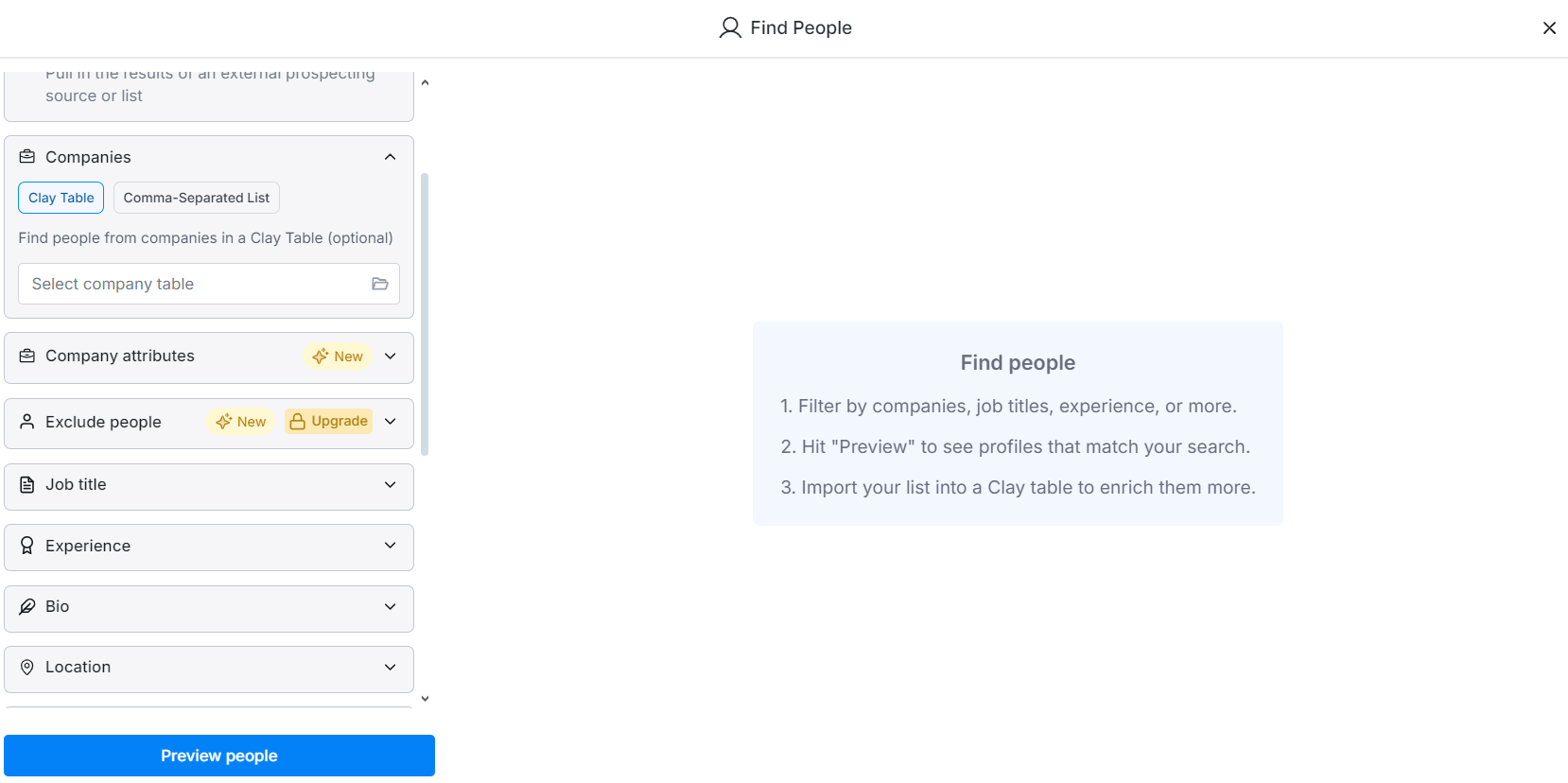
Clay "Find People" search: filter by companies, job titles, experience and location, preview matching profiles and import them into a Clay table Clay offers seamless integrations with various services using API keys, which can help reduce costs if used effectively.
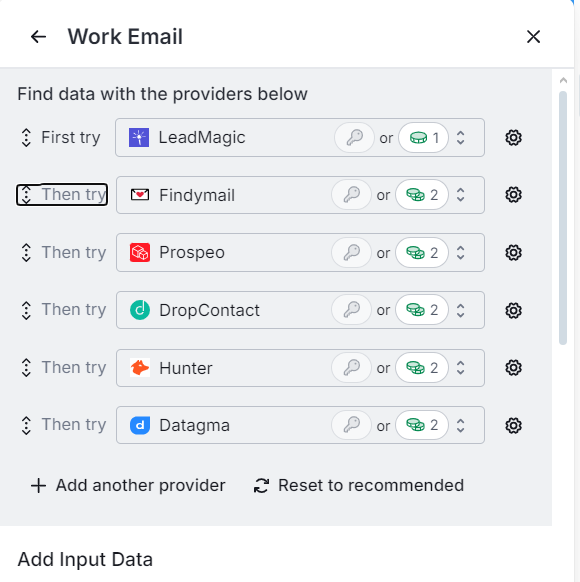
Clay "Work Email" enrichment waterfall trying providers in order: LeadMagic, Findymail, Prospeo, DropContact, Hunter, Datagma If you already have a list of companies, you can use Clay to find their LinkedIn profiles and, in less than 15 minutes, automate the collection of employee profiles for outreach.


Write Emails That Actually Convert
A good text is a text that turns cold customers into warm customers.
Use Smartlead, Instantly.ai, or Snov.io for sending.
Each mailbox you create should be used to send max. of 25 emails per day.
Take 1,000 leads.
Divide the leads into 10 equal batches, 100 contacts each.
Generate the top 10 lead generation ideas you found in the last step.
Pick the top 3.
Write 3 email campaigns for each of them. The shorter, the better.
Get straight to the point:
greetings
problem
how you solve it
how you are different from other people
CTA
Greetings: Be polite but direct.
Problem: Identify your client's problem in a way they would describe it themselves.
Use their own language. This builds trust, showing you truly understand their pain point.
How You Solve It:
Focus specifically on how you will solve their problem. Cut any unnecessary fluff, and keep it sharp.
Why You’re Different:
Think about what makes your solution unique. It’s likely your prospect has heard a lot of pitches, so identify something they haven’t heard before that sets you apart.
CTA (Call-to-Action): This is crucial, and there are different types:
Hard CTA: Directly ask for a call.
Examples:
"Do you have 5 minutes for a quick call?"
"Open to exploring further?"
"Are you interested in learning more?"
Soft CTA: Ask for permission to send more information.
Examples:
"Can I share more info?"
"Do you mind if I share more details on how this works?"
Value CTA: Offer value by sending resources (like videos or docs).
Examples:
"Can I send you a video explaining further?"
"Would a quick Loom video help?"
"Can I share a Notion page with more details?"
The number of letters depends on how long you plan to run the campaign.
The longer it is, the more letters in emails.
I recommend starting with three emails per campaign.
Optimize your campaign step by step
Monitor your campaign’s performance and optimize based on metrics:
Open rates < 30%: bad subject line
Reply rate < 3%: poorly targeted pain
Positive reply rate < 1%: bad offer
Call booking rate < 20%: bad follow-ups
Call show-up rate < 70%: bad pre-call follow-ups or ICP problem
Closing Rates < 20%: bad leads
UPD: Due to Google’s recent updates, tracking open rates is no longer an option.
If you are still using open tracking, Google may have already flagged your emails, and your leads may have noticed this too.
Many cold emails are now followed by a warning bar, which has forced us to reconsider using open tracking entirely.

For those unfamiliar, open tracking works by embedding a transparent pixel at the bottom of an email.
Once loaded, it triggers a code that informs your tracking tool the email was opened.
However, Google now warns recipients when emails contain tracking pixels and even highlights the "Report spam" button, making it easier for users to flag your message.
Tip: Switch to plain-text emails to avoid these issues.
Sending Emails
Maintain a 3:1 Ratio: Keep a ratio of 75+ warmup emails to 25 cold outreach emails
Start at Full Volume on Day 14: After 14 days of warmup, send up to 25 cold emails per mailbox per day, with warmup still running
Use Inbox Rotation: Implement an inbox rotation strategy where 50% of your inboxes are utilized for outreach during even weeks, and the other 50% during odd weeks. This method helps preserve the reputation of your email accounts and maintain good deliverability rates.
ROI Tracking
We also need to keep a strong focus on tracking ROI. It’s essential to calculate the cost of sending each email to a specific prospect, factoring in all the tools used in the process. Then, translate these costs into conversions to truly understand your return on investment.
This is especially important at scale. Conversion rates can drop as your volume increases, and you’ll need to continually optimize to maintain effectiveness. The key is knowing exactly which metrics you’re optimizing for, ensuring your budget and results align effectively.
Extras
Here are some additional recommendations for your cold outreach emails to ensure better deliverability and higher response rates:
— Text Only.
Avoid including links for open tracking, as this can seriously ruin your deliverability.
— No Domain Links.
Refrain from using any domain links in your emails.
— Check Spam Words.
Use our free tool at Outreach2day to screen for spammy words in your email content. Moreover our tool highlights the spam words in the text.
— Always Use Spintax to make every sent email unique.
Here’s an example image to illustrate:

But it’s not enough to just use Spintax for the greeting or signature. You should apply it as a multiplier throughout the entire message.
How does Spintax work?
SpinTax involves using similar words, phrases, or sentences that you can swap out while keeping the message's meaning intact.
Want to send 2,500 unique emails per day?
It’s simple. Each Spintax block is a multiplier.
For instance, a block like "Hey," "Hello," "Hi," and "How are you doing?" gives you 4 different versions of your email's opening.
Add another block in the middle of your email, and those 4 options multiply.
Example: 4 options at the start, and 4 in the middle = 16 unique versions of your email.
Add more blocks to generate even more variations and make sure each email is unique.


Tip: Don’t rely on rare forms of personalization, like unusual greetings.
Stick to varying the main body text and signature instead.
— Unsubscribe Link:
I recommend including an unsubscribe link:
If your clients are in Europe or Canada, it's a mandatory legal requirement.
You’ll also need to provide business information.
In other regions, this isn’t always necessary.
If someone wants to mark your email as spam - Gmail and Outlook will first offer to use your unsubscribe link, saving domain’s health.

— Avoid Adding These to Your Signature:
Never include links to your website. This is crucial. If someone marks your email as spam, it will negatively impact the reputation of all associated domains. If you reuse the same signature in multiple emails, deliverability across your entire campaign can suffer.
No images or logos (Company logos/ Personal photos)
No phone numbers.
— Why so many signature restrictions?
Usually, deliverability problems stem from overusing your signature block.
If you’re sending a large volume of emails and reusing the same signature, spam detectors will flag you, hurting the deliverability of all your emails.
Summary of Part 1
Now that you've set up your mailboxes and explored warmup tools, it’s crucial to ensure everything is optimized before starting your outreach.
Here’s a summary of key takeaways:
With the mailboxes warmed up and your outreach strategy in place, you’re ready to move on to scaling. Scaling successfully requires careful management of more leads, increasing email volumes, and integration of automation.
Part 2: Scaling Cold Outreach – Managing More Leads, Emails, and Automation
Once you know what’s working and have tested your audience, it's time to scale.
Here’s how you can do it without losing quality or getting overwhelmed.
Ongoing Mailbox Warming
After you’ve prepared the mailboxes for outreach, keep them on the warmup to maintain good health. This will keep the delivery rates high.
Building a Targeted Outreach Strategy
It can be tough to spot buying intent online.
Instead, I recommend a strategy of identifying your ICPs first.
Then, create a sequence of 6+ messages that you can send periodically to these prospects.
Some may not need your services immediately, but if you can follow up for 6+ months with valuable information, you’ll build relationships and stay top-of-mind when they’re ready.
As you interact with more prospects, you’ll learn to identify subgroups and signals that help close deals.
This understanding allows you to adapt your strategy for better targeting, improving conversion rates.
I often receive feedback from clients saying my outreach hit the mark at the right time. Strive for that outcome.
Managing Increased Responses
As your email volume increases, so will your responses. So how to manage them efficiently:
Automated Sequences: Use tools like Instantly.ai for automated follow-ups.
Typically, one person can handle the process if they effectively categorize response statuses, managing 80% of inquiries while 20% require unique handling.Sequence for Different Response Types:
Interested.
Set up an infinite follow-up sequence until you receive a definitive answer.
Add these leads to your CRM—this can be automated via API from Instantly, Smartlead, Snov.io or any other email sender.Not Ready to Talk Now.
Create a segment for these leads, pushing reminders to follow up later, automating the process as needed.Out of Office (OOO): Two approaches:
Simple: Send a follow-up email in a week with the same message.
Advanced: Use a script to track OOO replies and automatically push them into the right sequences.
Inbox Management
To effectively manage your inbox and respond to customer replies within 2 to 15 minutes, consider the following strategies:
Forwarding Emails to a Central Inbox:
How it works: You can forward emails from all your outreach accounts to a single email address, which will serve as your main hub for responding to customer inquiries.
Pros: This method allows you to share access with your team, enabling multiple people to respond to client inquiries quickly.
Cons: When replying from your main email (which received the forwarded message), your reply might be flagged as spam and never reach your customer’s inbox.
Using a Master Inbox from Your Outreach Tool (e.g., Smartlead, Snov):
How it works: Many outreach platforms offer a master inbox feature, making it easy to respond to customer replies and share access with your team.
Pros: It's convenient for managing replies and sharing responsibilities across your team.
Cons: Some replies may go untracked, getting lost in "untagged" categories, which means you might miss important messages from your leads.
Using Forwarding with Outreach2day:
How it works: When a client replies, their email is forwarded to a selected master inbox. When you reply from that master inbox, the message is sent back to the customer with identical content, ensuring continuity.
Pros: Easy to set up and ensures no forwarding chains get lost.
Cons: Only works with emails set up via Outreach2day.
Monitoring Email Performance
To ensure your emails continue to perform well, even without tracking open rates:
Response Benchmarks:
Check if your reply rates remain consistent.
Domain Health:
Use MXToolbox to verify your domains aren’t blacklisted, noting that not all lists carry the same weight.
Not all blacklists are equally important in the email world.Email has been around for over 40 years, and blacklists have changed a lot.
In the past, business blacklists mostly focused on their own company rules.
Now, there are tools like MX Toolbox that help us understand which blacklists really matter.
The most important blacklists to watch are Spamhaus and Barracuda.
If you end up on these lists, don't worry! You still have options.
You can contact their support teams for help getting removed from the list.
We show you the most important blacklist information in our interface.
This helps you focus on what really affects your email deliverability.
Remember, being on a blacklist doesn't mean game over for your emails.
It's just a signal that we need to take action to improve your sender reputation.
Regular Checkups:
With tools like Outreach2day, you can run regular performance checks to evaluate delivery success on different domains.
You can also run free automated tests to see if your emails pass spam filters.
The Outreach2day mailbox healthcheck with blacklist and DNS status per domain Content Quality:
Ensure your email content passes spam checks; use our spam checker to identify potential issues.
CRM Management
Maintaining a CRM like Salesforce, Hubspot or Pipedrive is essential as volume increases, helping you track leads and follow-ups. Key features include:
Importing leads from Instantly automatically.
Updating statuses when calls are booked.

Follow-Up Strategies for Calls
Utilize tools like Calendly for booking and follow-up reminders, aiming for a minimum 20% call booking rate and at least 70%+ show up rate.

Here is example of one of my follow-up emails. This follow-up reminder I use to ensure my upcoming calls stay on track.

Closing Calls
Your goal is to empower clients to make informed decisions by pinpointing their main challenges.
After running 10 calls, record them and analyze the transcripts with ChatGPT to determine what works and what doesn't.
Effective listening is crucial—remember the golden rule: clients should speak 80% of the time.
Repeat this process after every 10 calls to refine your approach.
Aim for a 20-30% deal-closing rate:
if you exceed it — consider raising your prices;
if it's lower — reevaluate your pricing strategy.
Summary of Part 2
Scale your outreach by warming mailboxes, finding quality leads, and automating follow-ups. Monitor domain health and campaign results regularly.
Use CRM tools to track progress, and adjust based on performance.
Here’s a summary of key takeaways:
Successful scaling keeps quality high as volume grows.
Conclusion
Thank you for taking the time to read through this guide. I’m here to help you succeed in your cold outreach efforts—let’s work together to maximize your results.
Book a 30 mins session where I’ll dive into your email outreach strategy and identify quick wins to improve your results: pick a time in the calendar below.
Try out Outreach2day— a tool that automates the creation of mailboxes for cold outreach, designed to help you improve deliverability, avoid spam filters, and refine your cold email content.
Join my network on LinkedIn to keep up with the latest strategies and tools in cold email marketing.
I regularly share insights and tips that can help you succeed.
Let’s connect via LinkedIn: Max Korolev

Book a call to discuss
Trouble booking? Book on Calendly


See deliverability issues before they kill performance
Check each mailbox's daily inbox, spam and bounce rate, replace the weak ones early, and keep warmup, protection, and sending in one place.